Guide #4 of 16
Product Listing
Beginner Friendly
7 min read
Updated November 2026
How to List a Single Product on Meesho & Pass QC in 2 Hours
Master single product listing on Meesho Supplier Panel. Image standards, keyword-rich titles, HSN code selection, dual return pricing, and passing QC on first attempt.
Visual Navigation Screen & Step Pointers
Follow the numbered pink badges ❶ ❷ ❸ ❹ on the actual portal interface below
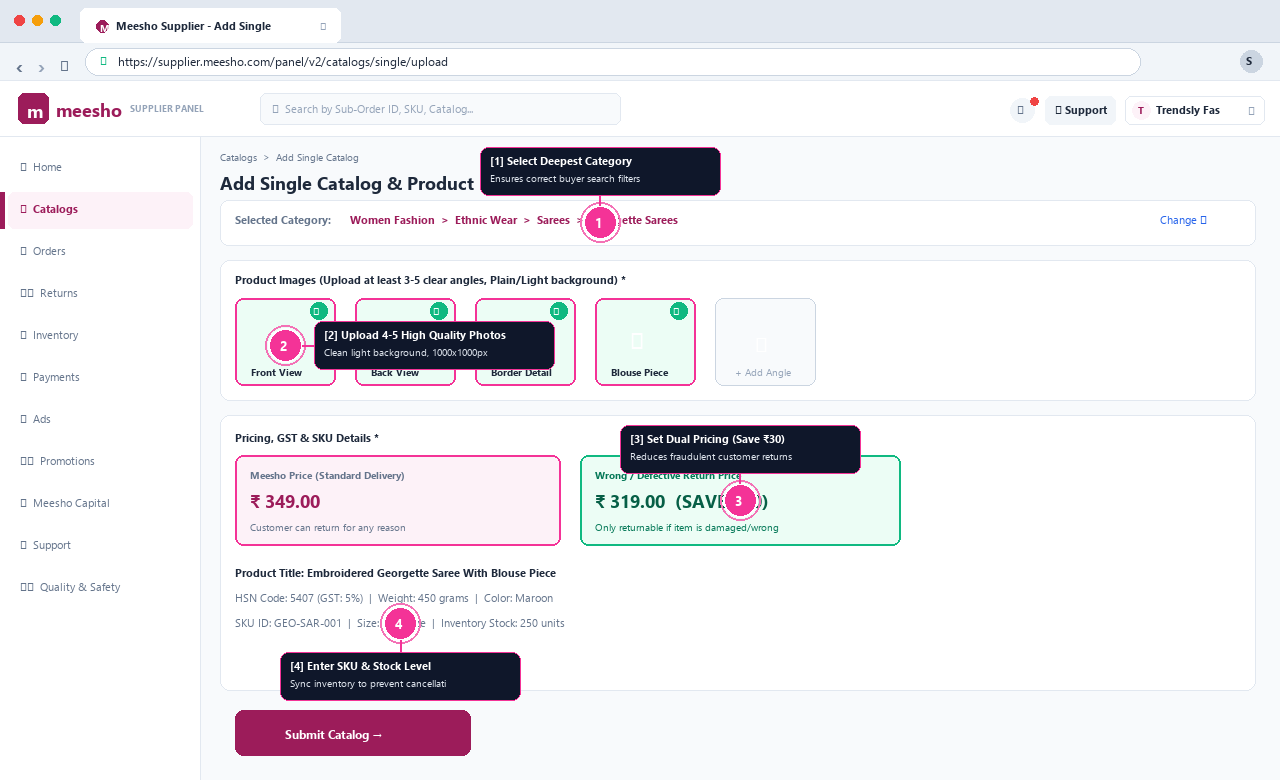
Meesho Single Catalog Editor with Visual Navigation Pointers
Open in Tab
Navigation Step Explanations:
1
1. Navigate to Meesho Single Catalog Upload
Open Meesho Single Catalog Upload . Pick the deepest subcategory (e.g. Women Ethnic > Sarees > Georgette Sarees).
Tip: Picking the wrong sub-category causes instant QC rejection.
2
2. Upload 3-5 High-Resolution Product Angles
Upload Front angle (mandatory white/clean background), Back angle, and Detail closeup (min 1000x1000px). For image hosting, see Bulk Image Upload.
Tip: Do NOT put phone numbers, watermarks, or promotional text over images.
3
3. Set Dual Return Pricing Slabs
Enter Meesho Price (All Returns) e.g. ₹349, and Defect-Only Return Price e.g. ₹319. Calculate your exact profit, packaging charges, and margin using our Trendsly Meesho Profit Calculator.
Tip: Keep Defect-Only price ₹20-₹40 cheaper; 75% of buyers choose this, cutting return rates in half!
4
4. Assign HSN Code & GST Tax Slab
Enter 4 or 6-digit HSN code and GST slab. Look up exact codes with our Trendsly Meesho HSN Finder and review courier reverse shipping on Meesho RTO Rate Card.
Tip: Surat sarees generally fall under HSN 5407 (5% GST).
5
5. Enter SKU, Stock & Submit for 2-Hour QC
Enter product weight, SKU code, and available stock. Click 'Submit Catalog'. Meesho QC team approves clean listings in 2 to 4 hours.
Tip: If QC flags an error, check the 'QC Error' tab, adjust image or title, and re-submit.
Step-by-Step Execution Guide
Follow this practical workflow to achieve 100% compliance without account penalties
1
Step 1: 1. Navigate to Meesho Single Catalog Upload
Open Meesho Single Catalog Upload . Pick the deepest subcategory (e.g. Women Ethnic > Sarees > Georgette Sarees).
Action: Picking the wrong sub-category causes instant QC rejection.
2
Step 2: 2. Upload 3-5 High-Resolution Product Angles
Upload Front angle (mandatory white/clean background), Back angle, and Detail closeup (min 1000x1000px). For image hosting, see Bulk Image Upload.
Action: Do NOT put phone numbers, watermarks, or promotional text over images.
3
Step 3: 3. Set Dual Return Pricing Slabs
Enter Meesho Price (All Returns) e.g. ₹349, and Defect-Only Return Price e.g. ₹319. Calculate your exact profit, packaging charges, and margin using our Trendsly Meesho Profit Calculator.
Action: Keep Defect-Only price ₹20-₹40 cheaper; 75% of buyers choose this, cutting return rates in half!
4
Step 4: 4. Assign HSN Code & GST Tax Slab
Enter 4 or 6-digit HSN code and GST slab. Look up exact codes with our Trendsly Meesho HSN Finder and review courier reverse shipping on Meesho RTO Rate Card.
Action: Surat sarees generally fall under HSN 5407 (5% GST).
5
Step 5: 5. Enter SKU, Stock & Submit for 2-Hour QC
Enter product weight, SKU code, and available stock. Click 'Submit Catalog'. Meesho QC team approves clean listings in 2 to 4 hours.
Action: If QC flags an error, check the 'QC Error' tab, adjust image or title, and re-submit.
PRO SELLER ADVICE FROM TOP MEESHO SUPPLIERS
- • Keep SLA Under 24 Hours: Meesho algorithms prioritize catalogs from suppliers who pack and mark orders 'Ready to Ship' on the same day.
- • Price Strategically: Always offer both All-Return and Defect-Only pricing; 70%+ of smart shoppers choose Defect-Only, cutting customer returns in half.
- • Maintain 100% Stock Sync: Out-of-stock cancellations immediately reduce catalog ranking across search recommendations.
CRITICAL PITFALLS TO AVOID
- • Never Cancel Orders Manually: Meesho imposes up to ₹50 or 10% penalty per cancelled order. Adjust inventory to 0 instead of cancelling incoming orders.
- • Never Share Return Delivery OTP Without Inspection: Always check if the return package is torn, damaged, or empty before giving the delivery driver the OTP.
- • Never Miss the 7-Day Claim Deadline: File damaged or wrong return claims within 7 days of delivery with continuous unboxing video proof.
❓ Frequently Asked Questions
Instant answers to common questions sellers ask about this topic
Why did my catalog get rejected in Meesho QC?
Top reasons: blurry images, text/watermark on main photo, price lower than minimum allowed threshold, or missing mandatory size chart.
What is the difference between All Return and Defect Return Price?
All Return Price allows customers to return for any reason. Defect Return Price is lower and only allows returns if the seller sent the wrong or damaged item.