Guide #3 of 16
Account & Tax
Intermediate
8 min read
Updated November 2026
How to Apply for GST for Meesho Seller Account
Complete 2026 roadmap to register for a new GSTIN (Regular Taxpayer) on reg.gst.gov.in. Mandatory documents, TRN, ARN, Aadhaar biometric e-KYC, and Meesho activation.
Visual Navigation Screen & Step Pointers
Follow the numbered pink badges ❶ ❷ ❸ ❹ on the actual portal interface below
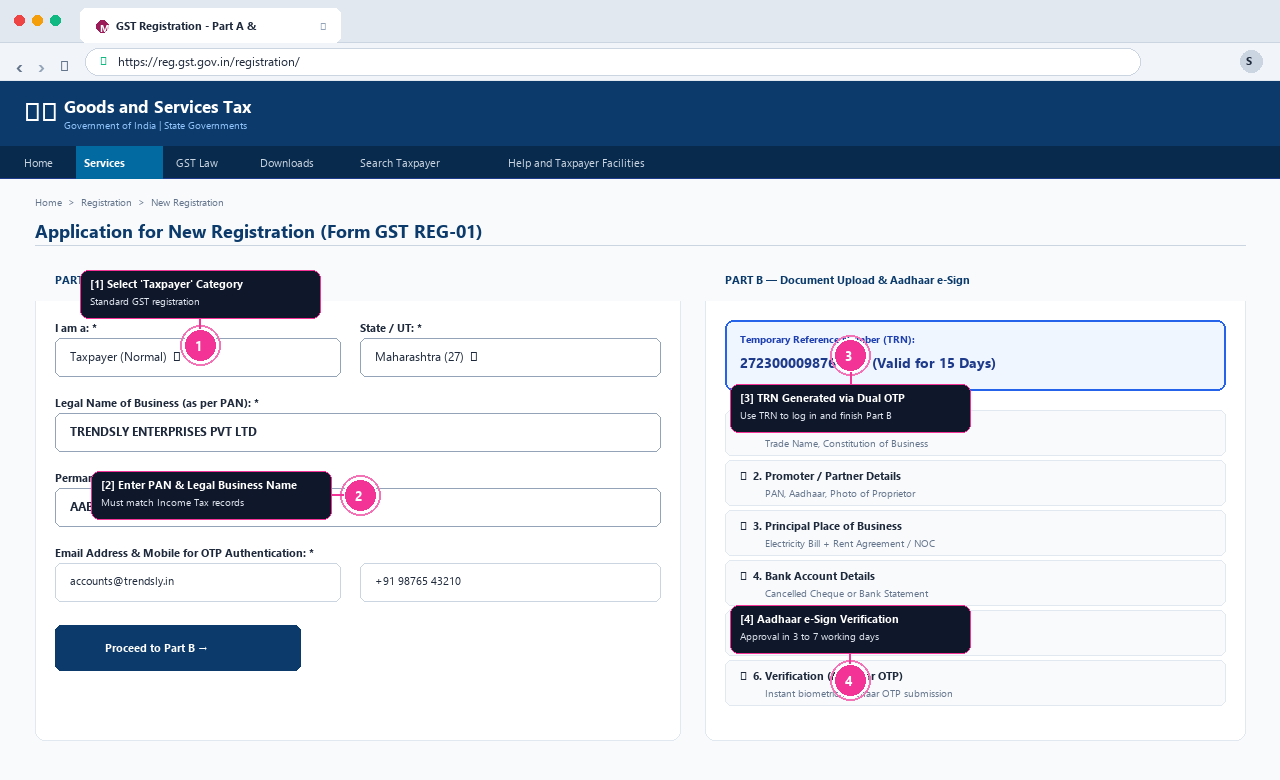
GST Portal New Registration (Part A & B) with Visual Pointers
Open in Tab
Navigation Step Explanations:
1
1. Part A: Generate TRN on GST Portal
Visit official GST Registration Portal (reg.gst.gov.in) . Select 'New Registration' > Taxpayer > State & District. Enter Legal Business Name, PAN, Mobile, and Email.
Tip: TRN remains valid for 15 days to complete Part B.
2
2. Assign Product HSN Codes in Part B
In Goods & Services section, enter the 4 or 6-digit HSN codes of your products. Look up your category codes using Trendsly HSN Code Finder and calculate tax rates with Trendsly GST Calculator.
Tip: Top HSN codes: 5407 (Sarees), 6204 (Kurtas/Suits), 7117 (Artificial Jewellery).
3
3. Upload Place of Business Documents
Upload proof of business location: Electricity bill or Property tax receipt + Rent Agreement or NOC Consent letter from owner.
Tip: Home residential address is 100% valid as principal place of business.
4
4. Complete Aadhaar Biometric / OTP e-KYC
Click 'Opt for Aadhaar Authentication'. An instant UIDAI OTP link is sent. Completing this grants GST approval in 3 to 7 working days. Once approved, update in Meesho Supplier Portal .
Tip: Ensuring Aadhaar has your active mobile linked avoids manual physical verification.
Step-by-Step Execution Guide
Follow this practical workflow to achieve 100% compliance without account penalties
1
Step 1: 1. Part A: Generate TRN on GST Portal
Visit official GST Registration Portal (reg.gst.gov.in) . Select 'New Registration' > Taxpayer > State & District. Enter Legal Business Name, PAN, Mobile, and Email.
Action: TRN remains valid for 15 days to complete Part B.
2
Step 2: 2. Assign Product HSN Codes in Part B
In Goods & Services section, enter the 4 or 6-digit HSN codes of your products. Look up your category codes using Trendsly HSN Code Finder and calculate tax rates with Trendsly GST Calculator.
Action: Top HSN codes: 5407 (Sarees), 6204 (Kurtas/Suits), 7117 (Artificial Jewellery).
3
Step 3: 3. Upload Place of Business Documents
Upload proof of business location: Electricity bill or Property tax receipt + Rent Agreement or NOC Consent letter from owner.
Action: Home residential address is 100% valid as principal place of business.
4
Step 4: 4. Complete Aadhaar Biometric / OTP e-KYC
Click 'Opt for Aadhaar Authentication'. An instant UIDAI OTP link is sent. Completing this grants GST approval in 3 to 7 working days. Once approved, update in Meesho Supplier Portal .
Action: Ensuring Aadhaar has your active mobile linked avoids manual physical verification.
PRO SELLER ADVICE FROM TOP MEESHO SUPPLIERS
- • Keep SLA Under 24 Hours: Meesho algorithms prioritize catalogs from suppliers who pack and mark orders 'Ready to Ship' on the same day.
- • Price Strategically: Always offer both All-Return and Defect-Only pricing; 70%+ of smart shoppers choose Defect-Only, cutting customer returns in half.
- • Maintain 100% Stock Sync: Out-of-stock cancellations immediately reduce catalog ranking across search recommendations.
CRITICAL PITFALLS TO AVOID
- • Never Cancel Orders Manually: Meesho imposes up to ₹50 or 10% penalty per cancelled order. Adjust inventory to 0 instead of cancelling incoming orders.
- • Never Share Return Delivery OTP Without Inspection: Always check if the return package is torn, damaged, or empty before giving the delivery driver the OTP.
- • Never Miss the 7-Day Claim Deadline: File damaged or wrong return claims within 7 days of delivery with continuous unboxing video proof.
❓ Frequently Asked Questions
Instant answers to common questions sellers ask about this topic
Can I register GST on my residential home address?
Yes! You can use your home electricity bill along with a simple consent letter or rent agreement from the family owner.
How many days does it take to get a GST number?
With successful Aadhaar authentication, GST registration is typically approved within 3 to 7 working days.