Guide #1 of 16
Account & Tax
Beginner Friendly
6 min read
Updated November 2026
How to Open a Meesho Seller Account (GST & Non-GST 2026)
Step-by-step 2026 guide on how to register and open a Meesho supplier account with or without GSTIN. Covers mobile OTP, warehouse pickup address, bank verification, and launching in 10 minutes.
Visual Navigation Screen & Step Pointers
Follow the numbered pink badges ❶ ❷ ❸ ❹ on the actual portal interface below
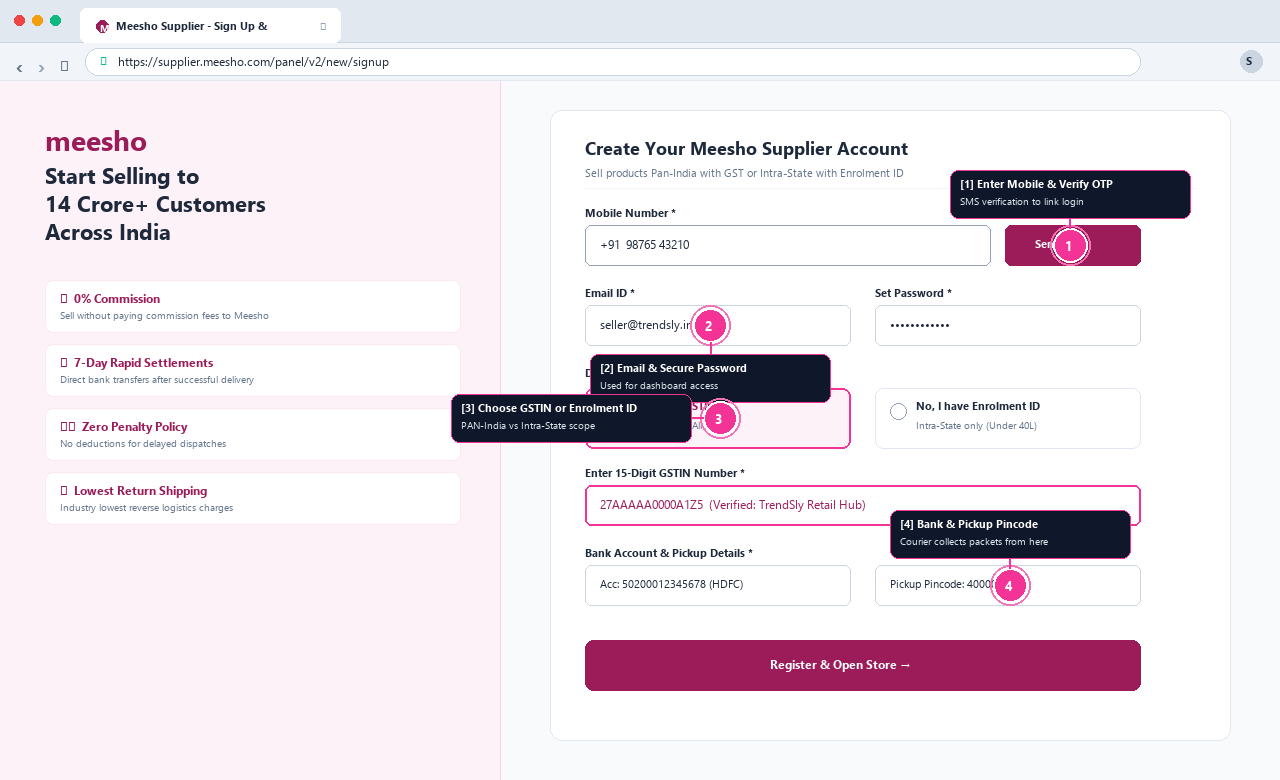
Meesho Supplier Registration Portal (supplier.meesho.com) with Visual Pointers
Open in Tab
Navigation Step Explanations:
1
1. Visit Meesho Supplier Website & Verify Mobile OTP
Go to the official Meesho Supplier Website and click on Start Selling . Enter your 10-digit mobile number to receive an instant 6-digit SMS OTP, enter your business email, and create a strong password.
Tip: Use a dedicated SIM card and business email that won't change.
2
2. Select Tax Identity (GST vs Non-GST Enrolment ID)
Choose between Standard GST (15-digit GSTIN for PAN-India selling) or Non-GST (16-digit Enrolment ID via Official GST Portal for Intra-State selling up to ₹40L turnover). See our Enrolment ID Guide or Apply GST Guide.
Tip: If you don't have GST yet, choose Non-GST Enrolment ID (Free in 5 mins).
3
3. Set Warehouse Pickup Address & Courier Pincode
Provide the exact street address, floor/shop number, and pincode from where courier delivery partners (Delhivery, Shadowfax, Xpressbees) will pick up your parcels.
Tip: Ensure the pincode is serviceable by standard e-commerce couriers.
4
4. Link Bank Account (Instant Penny Drop Verification)
Enter your Bank Account Number and IFSC code. Meesho deposits ₹1 instantaneously to verify that the account holder's legal name matches your PAN card.
Tip: Savings or Current account in the name of the PAN holder is accepted.
5
5. Enter Store Name & Start Sourcing Products
Type an attractive store brand name. Explore winning high-demand items on Trendsly Product Research and discover factory-direct manufacturers in our Surat & Jaipur Wholesalers Directory.
Tip: Store name can be changed later from Account Settings if needed.
Step-by-Step Execution Guide
Follow this practical workflow to achieve 100% compliance without account penalties
1
Step 1: 1. Visit Meesho Supplier Website & Verify Mobile OTP
Go to the official Meesho Supplier Website and click on Start Selling . Enter your 10-digit mobile number to receive an instant 6-digit SMS OTP, enter your business email, and create a strong password.
Action: Use a dedicated SIM card and business email that won't change.
2
Step 2: 2. Select Tax Identity (GST vs Non-GST Enrolment ID)
Choose between Standard GST (15-digit GSTIN for PAN-India selling) or Non-GST (16-digit Enrolment ID via Official GST Portal for Intra-State selling up to ₹40L turnover). See our Enrolment ID Guide or Apply GST Guide.
Action: If you don't have GST yet, choose Non-GST Enrolment ID (Free in 5 mins).
3
Step 3: 3. Set Warehouse Pickup Address & Courier Pincode
Provide the exact street address, floor/shop number, and pincode from where courier delivery partners (Delhivery, Shadowfax, Xpressbees) will pick up your parcels.
Action: Ensure the pincode is serviceable by standard e-commerce couriers.
4
Step 4: 4. Link Bank Account (Instant Penny Drop Verification)
Enter your Bank Account Number and IFSC code. Meesho deposits ₹1 instantaneously to verify that the account holder's legal name matches your PAN card.
Action: Savings or Current account in the name of the PAN holder is accepted.
5
Step 5: 5. Enter Store Name & Start Sourcing Products
Type an attractive store brand name. Explore winning high-demand items on Trendsly Product Research and discover factory-direct manufacturers in our Surat & Jaipur Wholesalers Directory.
Action: Store name can be changed later from Account Settings if needed.
PRO SELLER ADVICE FROM TOP MEESHO SUPPLIERS
- • Keep SLA Under 24 Hours: Meesho algorithms prioritize catalogs from suppliers who pack and mark orders 'Ready to Ship' on the same day.
- • Price Strategically: Always offer both All-Return and Defect-Only pricing; 70%+ of smart shoppers choose Defect-Only, cutting customer returns in half.
- • Maintain 100% Stock Sync: Out-of-stock cancellations immediately reduce catalog ranking across search recommendations.
CRITICAL PITFALLS TO AVOID
- • Never Cancel Orders Manually: Meesho imposes up to ₹50 or 10% penalty per cancelled order. Adjust inventory to 0 instead of cancelling incoming orders.
- • Never Share Return Delivery OTP Without Inspection: Always check if the return package is torn, damaged, or empty before giving the delivery driver the OTP.
- • Never Miss the 7-Day Claim Deadline: File damaged or wrong return claims within 7 days of delivery with continuous unboxing video proof.
❓ Frequently Asked Questions
Instant answers to common questions sellers ask about this topic
Can I sell on Meesho without a GST number in 2026?
Yes! Government rules allow online selling without GST for intra-state sales up to ₹40 Lakhs annual turnover. You just need a free 16-digit Enrolment ID from the GST portal.
Does Meesho charge any registration fee or commission?
Meesho charges 0% registration fee and 0% commission on orders. Sellers keep 100% of the sale value minus applicable shipping and 1% TCS/TDS.
How long does account activation take?
Once your mobile, tax details, and bank account are verified, your supplier panel activates in under 10 minutes.