Guide #2 of 16
Account & Tax
Beginner Friendly
5 min read
Updated November 2026
How to Get Enrolment ID (Enrolment Number) for Non-GST Meesho Account
Official step-by-step guide to generating a free 16-digit Enrolment ID under Section 139A on the GST Portal (gst.gov.in) to sell on Meesho without GST.
Visual Navigation Screen & Step Pointers
Follow the numbered pink badges ❶ ❷ ❸ ❹ on the actual portal interface below
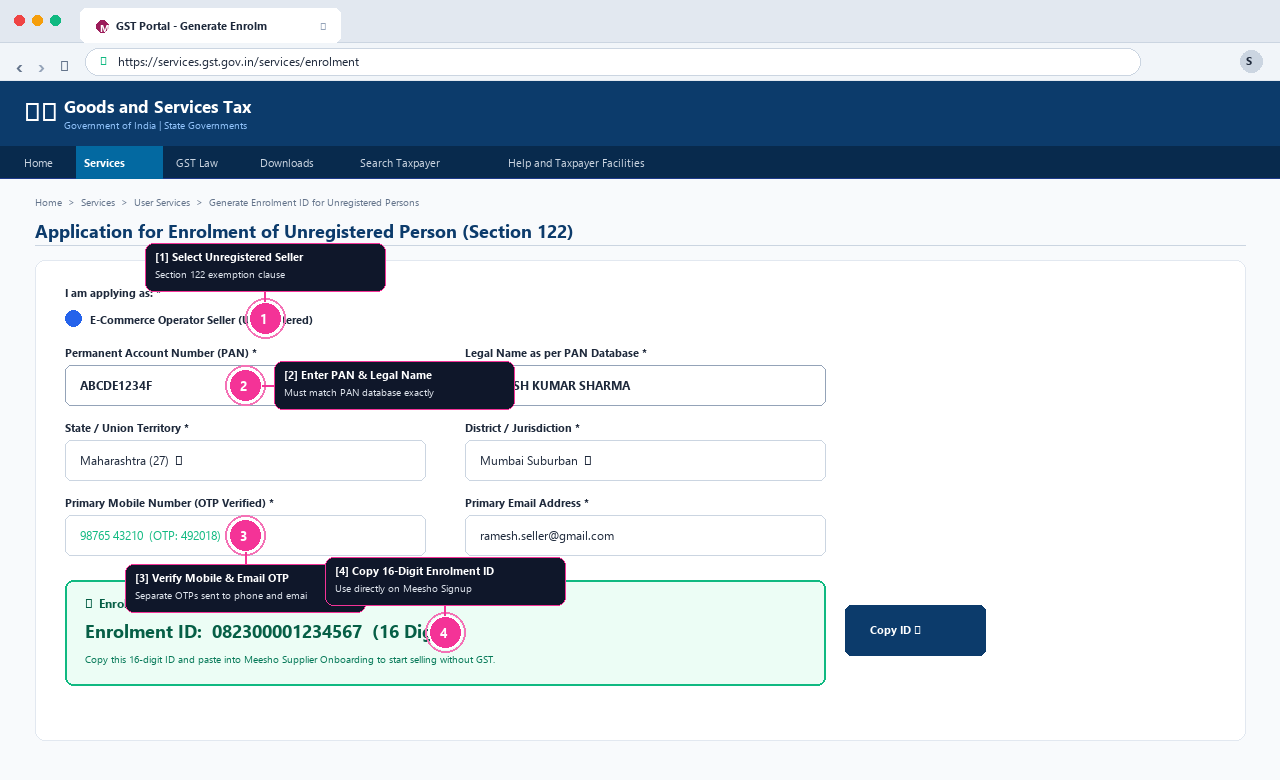
GST Portal User ID & Enrolment ID Generation Screen with Visual Pointers
Open in Tab
Navigation Step Explanations:
1
1. Navigate to User Services on GST Portal
Visit official GST Portal User Services (services.gst.gov.in) and click 'Generate User ID for Unregistered Applicant'.
Tip: You do NOT need to click 'New Registration' for GST.
2
2. Select 'To apply for Enrolment ID'
Check the radio button for 'To apply for Enrolment ID as E-Commerce Operator Supplier (Section 139A)'.
Tip: This categorizes you under the zero-GST exemption scheme for intra-state selling.
3
3. Enter State, District & Business Address
Choose your home or shop state and district. Non-GST sellers can supply within their registered state. Check tax rules with Trendsly Free GST Calculator.
Tip: Ensure state matches your warehouse pickup address on Meesho.
4
4. Validate PAN Card & Dual OTP
Enter your 10-character PAN number and legal name. Verify the 6-digit OTPs sent simultaneously to mobile and email.
Tip: Name must match letter-for-letter with Income Tax PAN records.
5
5. Copy Generated 16-Digit Enrolment ID into Meesho
The portal displays your 16-digit Enrolment ID (Format: 2724XXXXXXXXXXXX). Copy it directly into Meesho Supplier Onboarding .
Tip: Download and save the acknowledgement PDF for your records.
Step-by-Step Execution Guide
Follow this practical workflow to achieve 100% compliance without account penalties
1
Step 1: 1. Navigate to User Services on GST Portal
Visit official GST Portal User Services (services.gst.gov.in) and click 'Generate User ID for Unregistered Applicant'.
Action: You do NOT need to click 'New Registration' for GST.
2
Step 2: 2. Select 'To apply for Enrolment ID'
Check the radio button for 'To apply for Enrolment ID as E-Commerce Operator Supplier (Section 139A)'.
Action: This categorizes you under the zero-GST exemption scheme for intra-state selling.
3
Step 3: 3. Enter State, District & Business Address
Choose your home or shop state and district. Non-GST sellers can supply within their registered state. Check tax rules with Trendsly Free GST Calculator.
Action: Ensure state matches your warehouse pickup address on Meesho.
4
Step 4: 4. Validate PAN Card & Dual OTP
Enter your 10-character PAN number and legal name. Verify the 6-digit OTPs sent simultaneously to mobile and email.
Action: Name must match letter-for-letter with Income Tax PAN records.
5
Step 5: 5. Copy Generated 16-Digit Enrolment ID into Meesho
The portal displays your 16-digit Enrolment ID (Format: 2724XXXXXXXXXXXX). Copy it directly into Meesho Supplier Onboarding .
Action: Download and save the acknowledgement PDF for your records.
PRO SELLER ADVICE FROM TOP MEESHO SUPPLIERS
- • Keep SLA Under 24 Hours: Meesho algorithms prioritize catalogs from suppliers who pack and mark orders 'Ready to Ship' on the same day.
- • Price Strategically: Always offer both All-Return and Defect-Only pricing; 70%+ of smart shoppers choose Defect-Only, cutting customer returns in half.
- • Maintain 100% Stock Sync: Out-of-stock cancellations immediately reduce catalog ranking across search recommendations.
CRITICAL PITFALLS TO AVOID
- • Never Cancel Orders Manually: Meesho imposes up to ₹50 or 10% penalty per cancelled order. Adjust inventory to 0 instead of cancelling incoming orders.
- • Never Share Return Delivery OTP Without Inspection: Always check if the return package is torn, damaged, or empty before giving the delivery driver the OTP.
- • Never Miss the 7-Day Claim Deadline: File damaged or wrong return claims within 7 days of delivery with continuous unboxing video proof.
❓ Frequently Asked Questions
Instant answers to common questions sellers ask about this topic
What is the fee to get an Enrolment ID?
Generating an Enrolment ID on gst.gov.in is 100% free of cost. Never pay any third-party agent for this 5-minute process.
Can I sell across all India with an Enrolment ID?
No, Non-GST selling is restricted to intra-state orders (customers located in your own state). For all-India delivery, regular GST registration is required.
Do I need to file monthly GST returns with an Enrolment ID?
No! Non-GST sellers are completely exempt from filing GSTR-1 and GSTR-3B monthly tax returns.