Guide #6 of 16
Product Listing
Beginner Friendly
5 min read
Updated November 2026
How to Bulk Upload & Host Product Images for Meesho
Generate instant public CDN image links using Meesho's Image Bulk Upload tool. Step-by-step image hosting, batch URL copy, and Excel spreadsheet integration.
Visual Navigation Screen & Step Pointers
Follow the numbered pink badges ❶ ❷ ❸ ❹ on the actual portal interface below
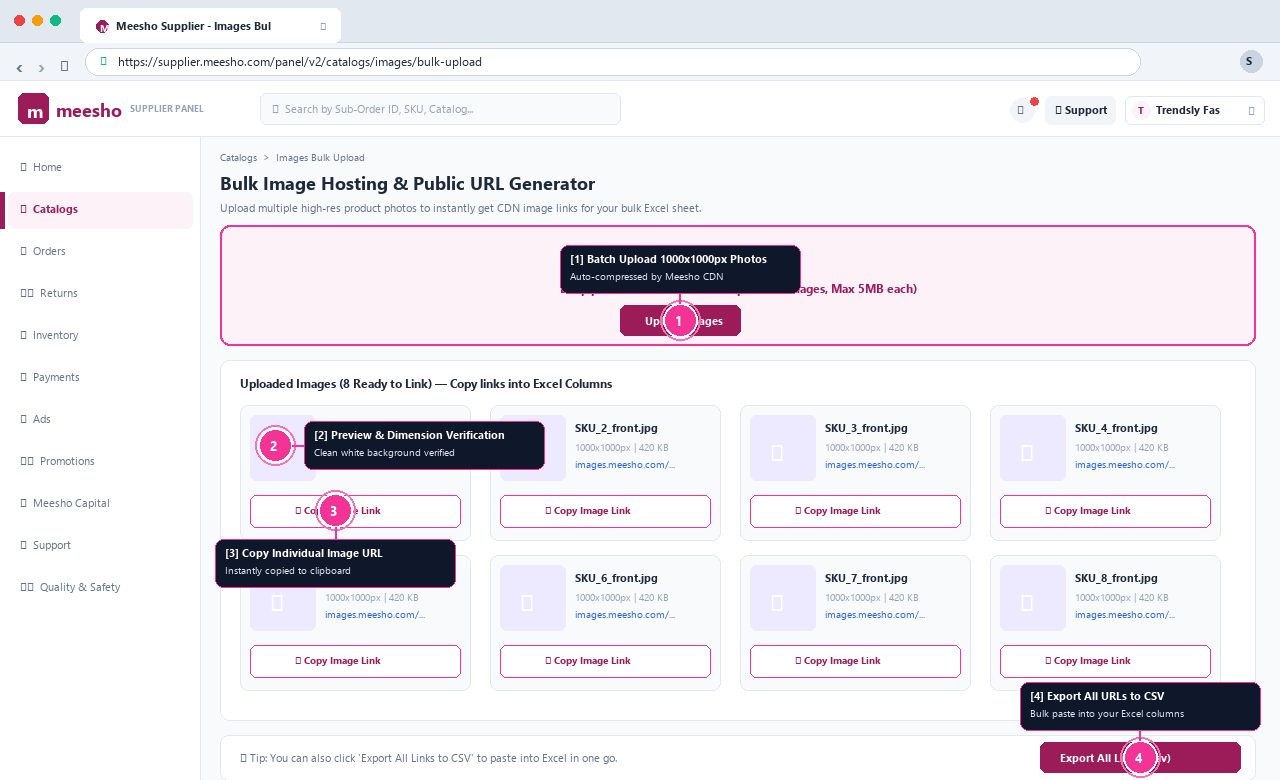
Meesho Images Bulk Upload & CDN Link Generator with Visual Pointers
Open in Tab
Navigation Step Explanations:
1
1. Open Meesho Images Bulk Upload Tool
Navigate to Meesho Images Bulk Upload .
Tip: This free tool stores your photos on Meesho's lightning-fast CDN.
2
2. Batch Drop Up to 100 Photos (1000x1000px)
Select up to 100 product images (JPG/PNG, max 5MB each). Ensure plain white or light grey backgrounds.
Tip: Name files by SKU (e.g. 'KUR-01_front.jpg') for effortless sorting.
3
3. Copy Individual Link or Export CSV
Click 'Copy Link' on each photo card or click 'Export All Links to CSV' to download complete URL list.
Tip: Links start with 'https://images.meesho.com/...'.
4
4. Paste URLs into Excel Bulk Listing Sheet
Paste copied CDN links directly into Columns H, I, J of your Meesho Bulk Excel Sheet or Trendsly Bulk Studio.
Tip: Hosting images on Meesho CDN prevents broken link QC rejections.
Step-by-Step Execution Guide
Follow this practical workflow to achieve 100% compliance without account penalties
1
Step 1: 1. Open Meesho Images Bulk Upload Tool
Navigate to Meesho Images Bulk Upload .
Action: This free tool stores your photos on Meesho's lightning-fast CDN.
2
Step 2: 2. Batch Drop Up to 100 Photos (1000x1000px)
Select up to 100 product images (JPG/PNG, max 5MB each). Ensure plain white or light grey backgrounds.
Action: Name files by SKU (e.g. 'KUR-01_front.jpg') for effortless sorting.
3
Step 3: 3. Copy Individual Link or Export CSV
Click 'Copy Link' on each photo card or click 'Export All Links to CSV' to download complete URL list.
Action: Links start with 'https://images.meesho.com/...'.
4
Step 4: 4. Paste URLs into Excel Bulk Listing Sheet
Paste copied CDN links directly into Columns H, I, J of your Meesho Bulk Excel Sheet or Trendsly Bulk Studio.
Action: Hosting images on Meesho CDN prevents broken link QC rejections.
PRO SELLER ADVICE FROM TOP MEESHO SUPPLIERS
- • Keep SLA Under 24 Hours: Meesho algorithms prioritize catalogs from suppliers who pack and mark orders 'Ready to Ship' on the same day.
- • Price Strategically: Always offer both All-Return and Defect-Only pricing; 70%+ of smart shoppers choose Defect-Only, cutting customer returns in half.
- • Maintain 100% Stock Sync: Out-of-stock cancellations immediately reduce catalog ranking across search recommendations.
CRITICAL PITFALLS TO AVOID
- • Never Cancel Orders Manually: Meesho imposes up to ₹50 or 10% penalty per cancelled order. Adjust inventory to 0 instead of cancelling incoming orders.
- • Never Share Return Delivery OTP Without Inspection: Always check if the return package is torn, damaged, or empty before giving the delivery driver the OTP.
- • Never Miss the 7-Day Claim Deadline: File damaged or wrong return claims within 7 days of delivery with continuous unboxing video proof.
❓ Frequently Asked Questions
Instant answers to common questions sellers ask about this topic
Do these image links expire?
No, images uploaded to Meesho's CDN remain permanently hosted and never expire.