Guide #7 of 16
Orders & Dispatch
Beginner Friendly
7 min read
Updated November 2026
Meesho Order Processing, Shipping Labels & Manifest Guide
Complete operational roadmap to fulfill orders on Meesho. Accepting pending orders, printing 4x6 barcode labels, packaging, courier manifest handover, and tracking EDD.
Visual Navigation Screen & Step Pointers
Follow the numbered pink badges ❶ ❷ ❸ ❹ on the actual portal interface below
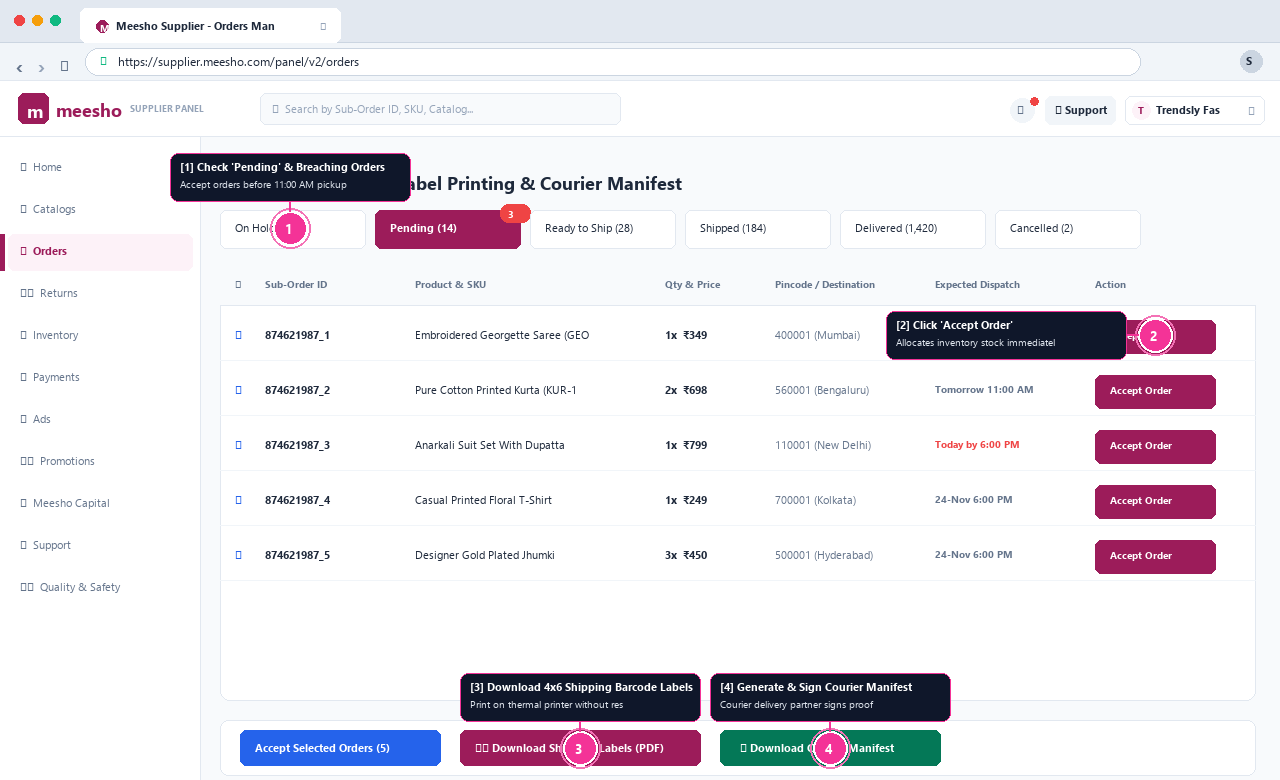
Meesho Orders Dashboard, Label Printing & Manifest with Visual Pointers
Open in Tab
Navigation Step Explanations:
1
1. Check 'Pending' Tab & Morning 11 AM Cutoff
Open Meesho Orders Dashboard . Review pending orders before the 11:00 AM daily cutoff for same-day courier pickup.
Tip: Dispatching within 24 hours unlocks 2X algorithm recommendation boost.
2
2. Click 'Accept Order' to Allocate Inventory
Select orders and click 'Accept Order'. Orders shift to 'Ready to Ship'. Calculate net profit with our Trendsly Meesho Calculator.
Tip: Stock is deducted automatically upon accepting orders.
3
3. Print 4x6 Inch Barcode Shipping Labels
In 'Ready to Ship', click 'Download Labels (PDF)'. Print 4x6 thermal adhesive labels without scaling or borders.
Tip: Never paste clear cellotape over thermal barcode.
4
4. Download Manifest & Collect Courier Signature
Click 'Download Manifest' before handover. When pickup executive (Delhivery, Shadowfax, Xpressbees) collects packets, ensure they sign with date and phone number.
Tip: Signed manifest is your legal proof against courier lost disputes.
Step-by-Step Execution Guide
Follow this practical workflow to achieve 100% compliance without account penalties
1
Step 1: 1. Check 'Pending' Tab & Morning 11 AM Cutoff
Open Meesho Orders Dashboard . Review pending orders before the 11:00 AM daily cutoff for same-day courier pickup.
Action: Dispatching within 24 hours unlocks 2X algorithm recommendation boost.
2
Step 2: 2. Click 'Accept Order' to Allocate Inventory
Select orders and click 'Accept Order'. Orders shift to 'Ready to Ship'. Calculate net profit with our Trendsly Meesho Calculator.
Action: Stock is deducted automatically upon accepting orders.
3
Step 3: 3. Print 4x6 Inch Barcode Shipping Labels
In 'Ready to Ship', click 'Download Labels (PDF)'. Print 4x6 thermal adhesive labels without scaling or borders.
Action: Never paste clear cellotape over thermal barcode.
4
Step 4: 4. Download Manifest & Collect Courier Signature
Click 'Download Manifest' before handover. When pickup executive (Delhivery, Shadowfax, Xpressbees) collects packets, ensure they sign with date and phone number.
Action: Signed manifest is your legal proof against courier lost disputes.
PRO SELLER ADVICE FROM TOP MEESHO SUPPLIERS
- • Keep SLA Under 24 Hours: Meesho algorithms prioritize catalogs from suppliers who pack and mark orders 'Ready to Ship' on the same day.
- • Price Strategically: Always offer both All-Return and Defect-Only pricing; 70%+ of smart shoppers choose Defect-Only, cutting customer returns in half.
- • Maintain 100% Stock Sync: Out-of-stock cancellations immediately reduce catalog ranking across search recommendations.
CRITICAL PITFALLS TO AVOID
- • Never Cancel Orders Manually: Meesho imposes up to ₹50 or 10% penalty per cancelled order. Adjust inventory to 0 instead of cancelling incoming orders.
- • Never Share Return Delivery OTP Without Inspection: Always check if the return package is torn, damaged, or empty before giving the delivery driver the OTP.
- • Never Miss the 7-Day Claim Deadline: File damaged or wrong return claims within 7 days of delivery with continuous unboxing video proof.
❓ Frequently Asked Questions
Instant answers to common questions sellers ask about this topic
What happens if pickup driver does not arrive?
Immediately raise a 'Pickup Delay' ticket on Meesho Supplier Support before 4:00 PM to protect against late dispatch penalties.