Guide #9 of 16
Returns & Claims
Crucial
8 min read
Updated November 2026
How to Claim Compensation for Damaged or Wrong Returns (SPF)
File Supplier Protection Fund (SPF) claims on Meesho. 360° unboxing video rules, AWB barcode photos, filing within 7 days, and getting 100% payout compensation.
Visual Navigation Screen & Step Pointers
Follow the numbered pink badges ❶ ❷ ❸ ❹ on the actual portal interface below
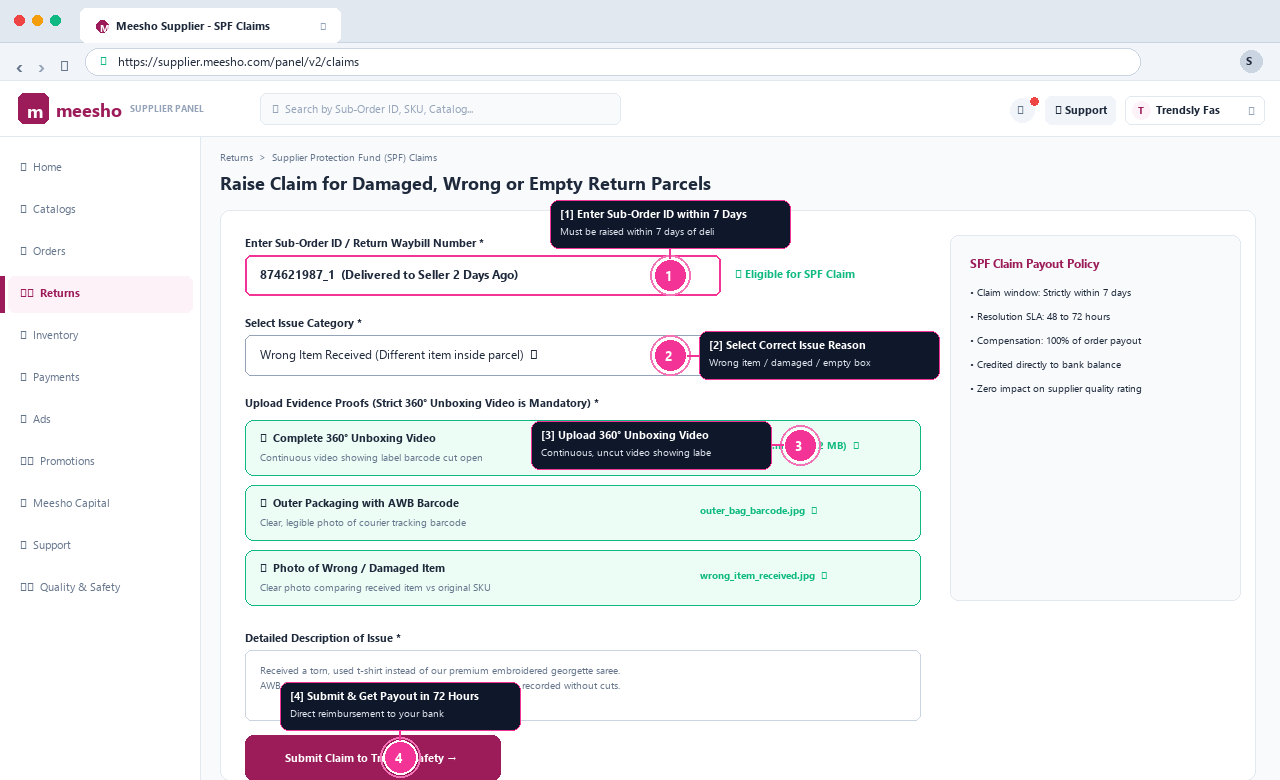
Meesho SPF Claims Center & Unboxing Video Upload with Visual Pointers
Open in Tab
Navigation Step Explanations:
1
1. Raise Claim Within 7 Days of Delivery
Open Meesho Claims Center within 7 days of receiving returned package. Select 'I have received a wrong / damaged return'.
Tip: Claims filed after 7 days are automatically rejected by system.
2
2. Enter Sub-Order ID & Select Exact Issue Category
Enter Sub-Order ID. Choose category: 'Wrong Item Received', 'Used Item', or 'Empty Outer Box'. Check Returns Tracking Guide.
Tip: Verify order eligibility before submitting.
3
3. Upload 360° Unboxing Video & AWB Barcode Photo
Upload continuous, uncut video showing legible courier label and opening of parcel. Upload photos of outer bag and damaged item received.
Tip: File size must be under 30MB; MP4 format is recommended.
4
4. Submit & Receive Bank Reimbursement in 72 Hours
Submit claim. Meesho Trust & Safety team reviews evidence and reimburses 100% of order payout directly into your next settlement. Contact Meesho Support for inquiries.
Tip: Approved claims appear under 'Compensation' in your Payments tab.
Step-by-Step Execution Guide
Follow this practical workflow to achieve 100% compliance without account penalties
1
Step 1: 1. Raise Claim Within 7 Days of Delivery
Open Meesho Claims Center within 7 days of receiving returned package. Select 'I have received a wrong / damaged return'.
Action: Claims filed after 7 days are automatically rejected by system.
2
Step 2: 2. Enter Sub-Order ID & Select Exact Issue Category
Enter Sub-Order ID. Choose category: 'Wrong Item Received', 'Used Item', or 'Empty Outer Box'. Check Returns Tracking Guide.
Action: Verify order eligibility before submitting.
3
Step 3: 3. Upload 360° Unboxing Video & AWB Barcode Photo
Upload continuous, uncut video showing legible courier label and opening of parcel. Upload photos of outer bag and damaged item received.
Action: File size must be under 30MB; MP4 format is recommended.
4
Step 4: 4. Submit & Receive Bank Reimbursement in 72 Hours
Submit claim. Meesho Trust & Safety team reviews evidence and reimburses 100% of order payout directly into your next settlement. Contact Meesho Support for inquiries.
Action: Approved claims appear under 'Compensation' in your Payments tab.
PRO SELLER ADVICE FROM TOP MEESHO SUPPLIERS
- • Keep SLA Under 24 Hours: Meesho algorithms prioritize catalogs from suppliers who pack and mark orders 'Ready to Ship' on the same day.
- • Price Strategically: Always offer both All-Return and Defect-Only pricing; 70%+ of smart shoppers choose Defect-Only, cutting customer returns in half.
- • Maintain 100% Stock Sync: Out-of-stock cancellations immediately reduce catalog ranking across search recommendations.
CRITICAL PITFALLS TO AVOID
- • Never Cancel Orders Manually: Meesho imposes up to ₹50 or 10% penalty per cancelled order. Adjust inventory to 0 instead of cancelling incoming orders.
- • Never Share Return Delivery OTP Without Inspection: Always check if the return package is torn, damaged, or empty before giving the delivery driver the OTP.
- • Never Miss the 7-Day Claim Deadline: File damaged or wrong return claims within 7 days of delivery with continuous unboxing video proof.
❓ Frequently Asked Questions
Instant answers to common questions sellers ask about this topic
What happens if Meesho rejects my SPF claim?
You can re-open the ticket within 48 hours by providing higher resolution photos and clarification.